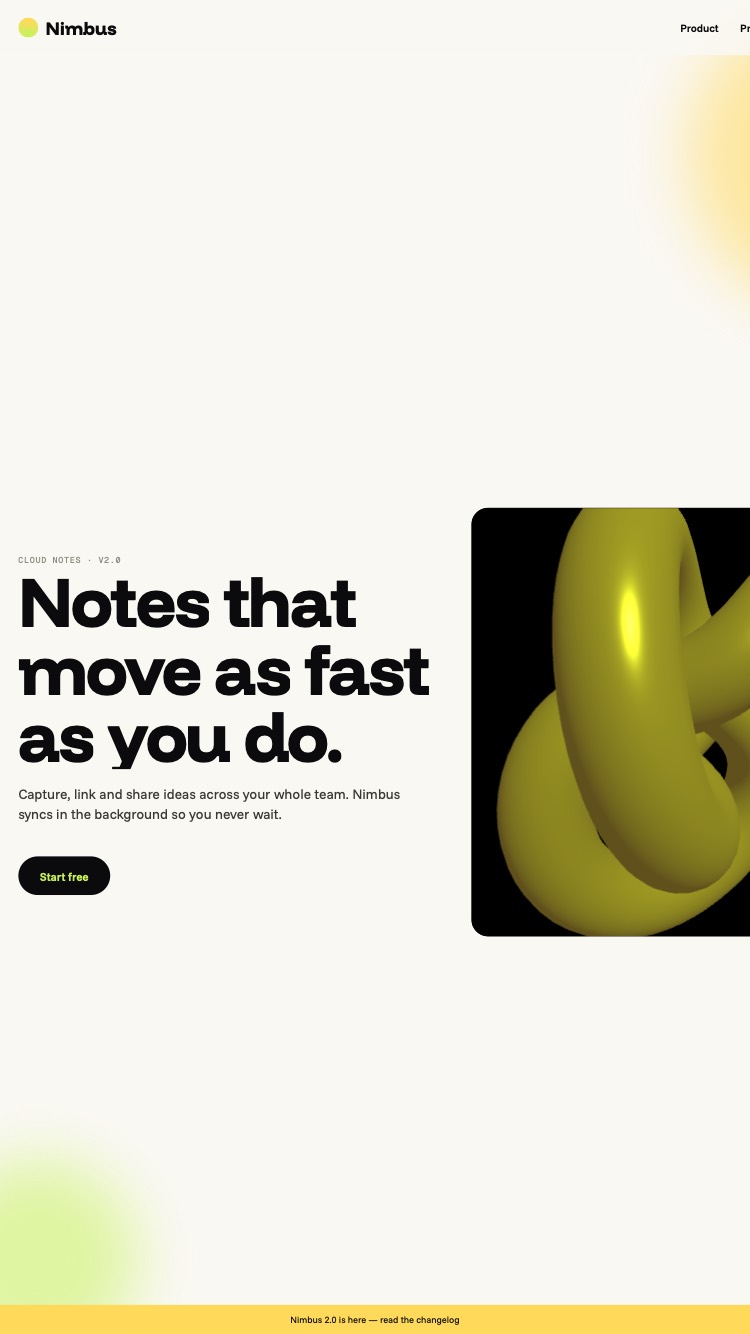
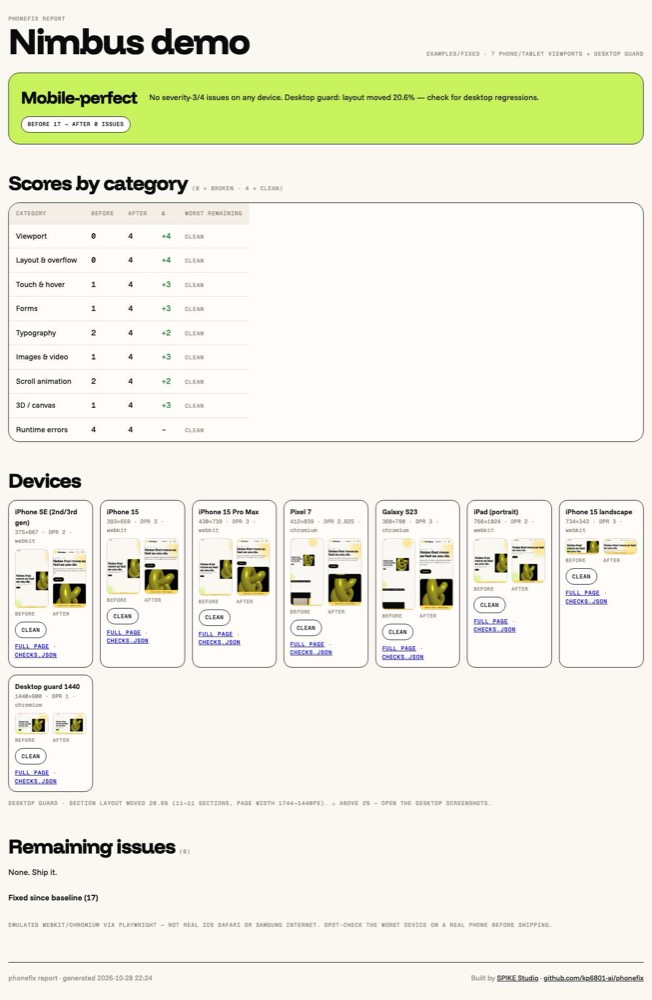
Your AI wrote the site at 1440px. phonefix audits it on seven real phone and tablet viewports, fixes every element that breaks (layout, touch, forms, video, scroll animation, 3D) and proves it with before and after screenshots.
Left: what your AI saw at 1440px. Right: what phonefix shipped on an iPhone. Same desktop design, fifteen issues to zero.
Install · one line
Pick your agent.
npx skills add kp6801-ai/phonefix
The skills CLI installs into whichever agents it finds. Then say: “make this mobile-perfect”.
npx skills add kp6801-ai/phonefix -a claude-code
# or, no CLI:
git clone https://github.com/kp6801-ai/phonefix ~/.claude/skills/phonefix
Shows up as the phonefix skill. Triggers on “mobile”, “responsive”, “breaks on my phone”.
curl -fsSL https://raw.githubusercontent.com/kp6801-ai/phonefix/main/skills/phonefix/scripts/install.sh | sh -s -- --agent cursor
Writes .cursor/rules/phonefix.mdc and copies the skill into .phonefix/.
curl -fsSL https://raw.githubusercontent.com/kp6801-ai/phonefix/main/skills/phonefix/scripts/install.sh | sh -s -- --agent codex
Appends a 14-line block to AGENTS.md between markers. Your existing rules stay.
curl -fsSL https://raw.githubusercontent.com/kp6801-ai/phonefix/main/skills/phonefix/scripts/install.sh | sh -s -- --agent windsurf
Appends to .windsurfrules.
curl -fsSL https://raw.githubusercontent.com/kp6801-ai/phonefix/main/skills/phonefix/scripts/install.sh | sh -s -- --agent copilot
Appends to .github/copilot-instructions.md.
curl -fsSL https://raw.githubusercontent.com/kp6801-ai/phonefix/main/skills/phonefix/scripts/install.sh | sh -s -- --agent gemini
Appends to GEMINI.md with an @import of the skill.
Playwright once per machine: npx playwright install chromium webkit. Or run --agent all and cover every agent in one go.
What it checks · thirty rules, nine categories
Every element. Not just the layout.
Viewport
The first thing AI forgets
meta missing or no device-width
zoom disabled
viewport-fit for the notch
Layout
Overflow, root cause
widest offenders listed by name
fixed px widths, no breakpoints
100vh jumps, fixed bars, safe-area
Touch
Thumbs, not cursors
tap targets under 44px
hover-only menus and reveals
mouseenter with no tap twin
Forms
No surprise zoom
inputs under 16px (iOS zooms)
inputmode, enterkeyhint
fixed footers vs the keyboard
Type
Readable at arm’s length
body under 16px
labels under 12px
clamp() instead of px
Media
Phone bytes, phone players
images without srcset
missing dimensions
video without muted, playsinline, poster
Scroll animation
GSAP that survives the URL bar
gsap.matchMedia per breakpoint
pins taller than the screen
desktop-pixel tweens, reduced motion
3D
WebGL a phone can run
DPR over 2, megapixel budget
stretched or fixed canvases
pause off-screen, context loss
Runtime
Errors first
console errors on load
uncaught exceptions per device
desktop guard: nothing regresses
Device matrix · emulated to scale
Seven viewports. Five scroll positions each.
WebKit for the iPhones and iPad, Chromium for Android. Each device gets screenshots at 0, 25, 50, 75 and 100 percent scroll so pinned sections and scroll-driven animation actually run, plus a full-page shot and a checks.json. Emulation is not a real phone: the report says which device to spot-check by hand.
How it works · five phases
Audit. Fix. Prove.
Discover
Detects the framework, Tailwind, GSAP, ScrollTrigger, Lenis, Three.js, R3F and where the viewport meta lives. Offline, nothing installed.
Baseline
Git checkpoint, then captures every route on every device. Severity-4 means the page breaks on a phone.
Audit
Scores nine categories 0 to 4, then the agent opens the two smallest-device screenshots. Eyes catch what the DOM cannot prove.
Fix
Ordered rules, root cause first. Never hides overflow, never disables zoom, never deletes an animation, never changes the desktop design.
Verify
Captures again and builds the report: verdict, score deltas, before/after grid, remaining issues with reasons, desktop drift.
Questions
Fair questions.
Does it change my desktop design?
No. Fixed widths become fluid (min(1200px, 100%)), hover effects stay for mice, animations get a mobile branch. A 1440px desktop guard capture measures section drift before and after; over two percent and the report tells the agent to look.
Does it work with Next.js, Nuxt, SvelteKit, Astro, Tailwind?
Yes. The references tell the agent where the viewport meta lives in each, how Tailwind’s mobile-first prefixes work, how to keep Three.js client-only, and how to revert GSAP with useGSAP. The scripts just need a URL or a static folder.
Is this a real iPhone?
It is Playwright’s WebKit and Chromium with device viewports, DPR, touch and user agents. Good enough to catch everything structural. The URL-bar collapse, the real keyboard and GPU limits differ on hardware, so the report names the worst device for a hand check.
Can I run it without an AI agent?
Yes. detect.mjs, capture.mjs and report.mjs are plain Node scripts. checks.js can be pasted into DevTools. The agent is what applies the fixes.
Who made this?
SPIKE Studio in Dubai. We build sites, systems and content for small businesses, and we got tired of AI-generated pages that fall apart on the phone every customer actually uses.